
|
|||
|


 |
|

 |
|

| Home |
| About |
| Hobbies |
| Software |
| Hardware |
| ICT Hotlist |
| Purpose |
React:


Ps3 Kdw Rebuild Database Pkg Upd [best] | Ultra HD
 Back to the ICT-Hotlist...
How to retrieve your FTP passwords from FileZilla
You probably once got an e-mail with the FTP settings for a download site, entered the credentials in FileZilla, lost the mail and now someone else needs the FTP account. Or you got a new PC assigned and suddenly need to FTP a bug report, noticing your sites and passwords are not transferred to the new PC. Of course you can contact your ftp partner, fill out a few forms, send them in and wait a few days whilst your boss gets angry behind your back when the sales system grinds to a halt.As you by now know from reading all the other tips, they do not work as FileZilla now encrypts the password in the configuration file.
These are the steps to get your password with the current versions of FileZilla.
- Open the file explorer and paste the path %AppData%/filezilla in the address bar and open the file sitemanager.xml in Notepad or your favorite text editor (NotePad++)
- Search for the section containing the ftp site. See for an example the next text box.
<Server>
<Host>ftp.van_Soest.it</Host>
<Port>21</Port>
<Protocol>0</Protocol>
<Type>0</Type>
<User>Johan</User>
<Pass encoding="base64">VGhpc0lzQVRlc3RQYXNzd29yZA==</Pass>
<Logontype>1</Logontype>
<TimezoneOffset>0</TimezoneOffset>
<PasvMode>MODE_DEFAULT</PasvMode>
<MaximumMultipleConnections>0</MaximumMultipleConnections>
<EncodingType>Auto</EncodingType>
<BypassProxy>0</BypassProxy>
<Name>ftp://ftp.van_Soest.it</Name>
<Comments />
<LocalDir />
<RemoteDir />
<SyncBrowsing>0</SyncBrowsing>
<DirectoryComparison>0</DirectoryComparison>ftp://ftp.van_Soest.it
</Server>
An example of a FileZilla server configuration. - You now can find the password in the line.
<Pass encoding="base64">VGhpc0lzQVRlc3RQYXNzd29yZA==</Pass>Notice the encoding type "base64". This explains the encoding type used to encrypt the password.
- Now open your favorite base64 decoding program. Every postmaster has one.
|
Use your favorite local base64 decoding program. This program keeps all data within the company walls and can do much more than the online variant demonstrated here.
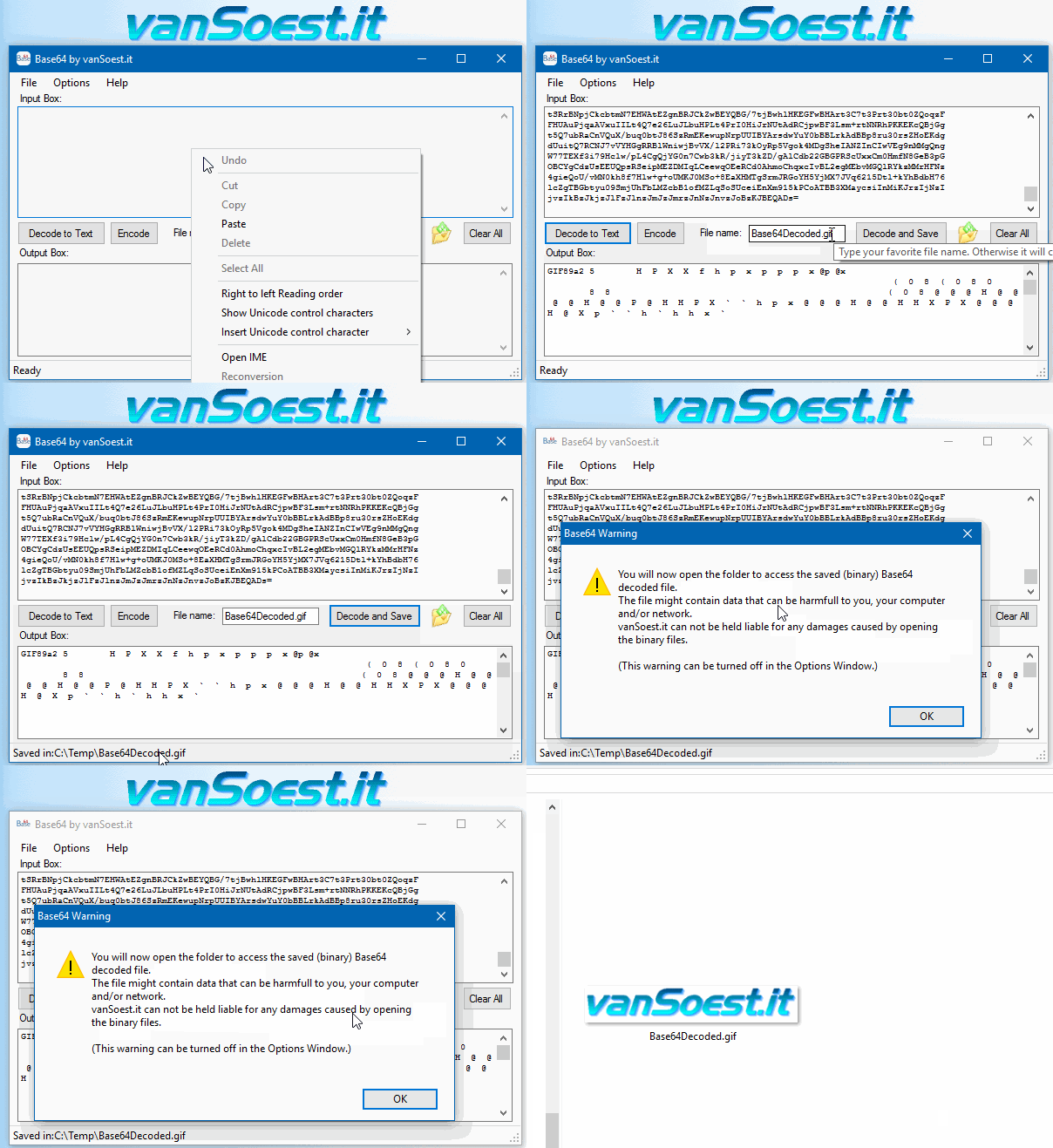 Copy everything between <Pass encoding = "base64"> and </Pass> into the text box. Now click on the "Decode to Text" button and the Output box will show your FileZilla password in plain text. |
Ps3 Kdw Rebuild Database Pkg Upd [best] | Ultra HD: This refers to PKG updates . In the PS3 scene, .pkg is the standard installation file format for downloadable content, game updates, DLC, and applications. "Upd" is simply an abbreviation for "update". This guide is for informational and educational purposes only. Modifying your PlayStation 3's firmware, installing homebrew, and playing game backups can violate the terms of service set by Sony Interactive Entertainment. These activities may void your warranty, potentially expose your console to security risks, and is considered software piracy if you do not own a legitimate copy of the games being played. Proceed at your own risk. Rebuilding the database is a maintenance step that reorganizes your console's hard drive so it can access data more efficiently. For PS3 users, it specifically: Cleans up the system ps3 kdw rebuild database pkg upd : Hold the power button again. You will hear one beep, then a quick double-beep . Release immediately after the double-beep. : The target console hardware environment (Fat, Slim, or Super Slim models). : This refers to PKG updates : Identifies and removes corrupted files that may cause system freezes or error messages. : This is not a standard PS3 feature. Instead, "KDW" refers to a specific brand of Custom Firmware (CFW) and a suite of tools developed by a scene group. Most notably, the group created KDW CFW2OFW , a utility that converts games (including their .pkg updates) to run on official firmwares. Other "KDW" tools include a "LIC.DAT Offline Generator" for PS3 and various other utilities. The "KDW" name helps differentiate these specific tools from other modding tools. This guide is for informational and educational purposes If a game update fails, or a game shows a black screen after updating, using the Rebuild Database function allows the system to properly register the new EBOOT.BIN or patch files in the dev_hdd0/game/ directory. Troubleshooting the Rebuild Process Understanding the PS3 KDW Rebuild Database Utility For owners of jailbroken PlayStation 3 systems, keeping the XMB (XrossMediaBar) organized and free of errors is essential. The utility is a specialized tool often distributed as a PKG file or integrated into custom firmware (CFW) tools. It simplifies the process of refreshing the console's internal filing system without needing to enter the system's native Safe Mode. What is the "Rebuild Database" Function? |

Scripts and programming examples disclaimer
Unless stated otherwise, the script sources and programming examples provided are copyrighted freeware. You may modify them, as long as a reference to the original code and hyperlink to the source page is included in the modified code and documentation. However, it is not allowed to publish (copies of) scripts and programming examples on your own site, blog, vlog, or distribute them on paper or any other medium, without prior written consent.Many of the techniques used in these scripts, including but not limited to modifying the registry or system files and settings, impose a risk of rendering the Operating System inoperable and loss of data. Make sure you have verified full backups and the associated restore software available before running any script or programming example. Use these scripts and programming examples entirely at your own risk. All liability claims against the author in relation to material or non-material losses caused by the use, misuse or non-use of the information provided, or the use of incorrect or incomplete information, are excluded. All content is subject to change and provided without obligation.